
When it's time to send your orders each month, here's a convenient way to download all your shipments in an easy format for fulfillment.
Go to Shipments
From the merchant portal, choose Shipments from the navigation menu.

Export List of Shipments
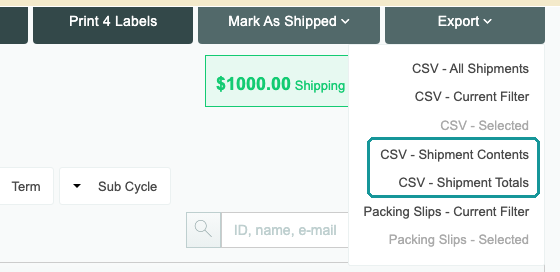
Click Export on the right side of the page, then choose:
- CSV - All Shipments: every shipment.
- CSV - Current Filter: the shipments the page shows with your current tab and filters.
- CSV - Selected: the shipments you’ve ticked. It stays greyed out until you tick one.
- CSV - Shipment Contents and CSV - Shipment Totals: packing files for the ship dates you choose, from all your billing schedules. See Exporting Shipment Contents and Shipment Totals.
- Packing Slips - Current Filter and Packing Slips - Selected: packing slips to print.
A banner at the top of the page shows the export’s progress. When it’s ready, click Download now, or use the link we email you.
Related Links: View a Shipment • Cancel a Shipment