
In step 2 of an upload, Every row checked, we check each row of your file against its subscription as it is now. Each row lands in one group, Ready, Wait, Need your OK, or Can’t change, and says what will happen or why it can’t change. Nothing changes for any subscriber until you apply the upload in step 4. For the steps themselves, see Uploading Renewal Dates, Skips, and Cancellations.
In This Article
- The Four Groups
- What Each Row Says
- Early Charges: Rows That Need Your OK
- Rows That Can’t Change
- Past Due and Suspended Subscribers
- Dates and Time Zones
- Common Questions
The Four Groups
| Group | What it means |
|---|---|
| Ready | It applies when you confirm in step 4. |
| Wait | “Renewing right now. Checked again when that finishes.” It’s included, and applies once that renewal finishes, if it still can. |
| Need your OK | The move would charge the subscriber early. It’s left out unless you choose Charge them early anyway. |
| Can’t change | It’s left out, with the reason. Nothing changes for that subscription. |
The four counts add up to the rows in your file. Rows that can’t change are greyed, and rows that need your OK are tinted.
What Each Row Says
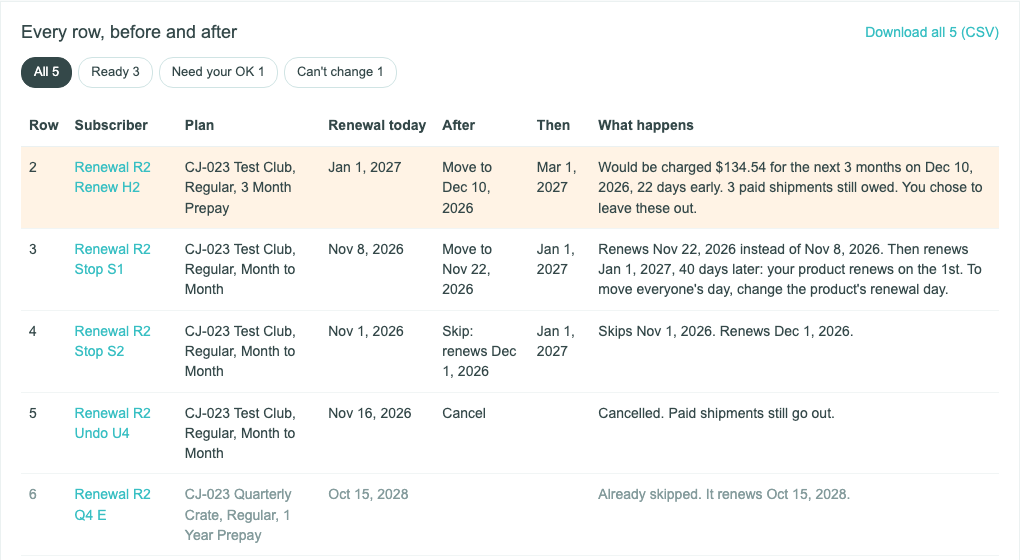
Each row shows its line in your file, the subscriber, their plan, Renewal today, After (what the row makes it), Then (the renewal after that), and What happens:
| Action | What happens, for example |
|---|---|
| move | “Renews Nov 22, 2026 instead of Nov 8, 2026.” |
| skip | “Skips Nov 1, 2026. Renews Dec 1, 2026.” |
| cancel | “Cancelled. Paid shipments still go out.” |
A move can add a line about the renewal after it:
- If your product renews on a set day of the month, the renewal after the move goes back to that day, for example “Then renews Jan 1, 2027, 40 days later: your product renews on the 1st. To move everyone’s day, change the product’s renewal day.”
- If your product renews on each subscriber’s own day, the new date becomes their day: “This sets its new monthly day.”, or weekly day.
- A gift, or a subscription with auto-renew off, ends on the new date instead and still won’t renew: “This moves when it ends.”
Early Charges: Rows That Need Your OK
Moving a renewal earlier brings its charge earlier. Two kinds of move would charge a subscriber sooner than their plan says, so they wait for your OK:
- A prepaid subscriber before their paid term ends. They’d pay for their next term while shipments they’ve paid for are still owed: “Would be charged $134.54 for the next 3 months on Dec 10, 2026, 22 days early. 3 paid shipments still owed.”
- A second charge within half a billing cycle. The new date is less than half a cycle after their last charge: “Would be charged $46.95 again 9 days after its last charge, on a monthly plan.”
A row can be both, and then it says both. The amount is what the next renewal would charge on the new date, with shipping and tax. “(estimated)” after an amount means part of it, such as shipping or tax, is an estimate.
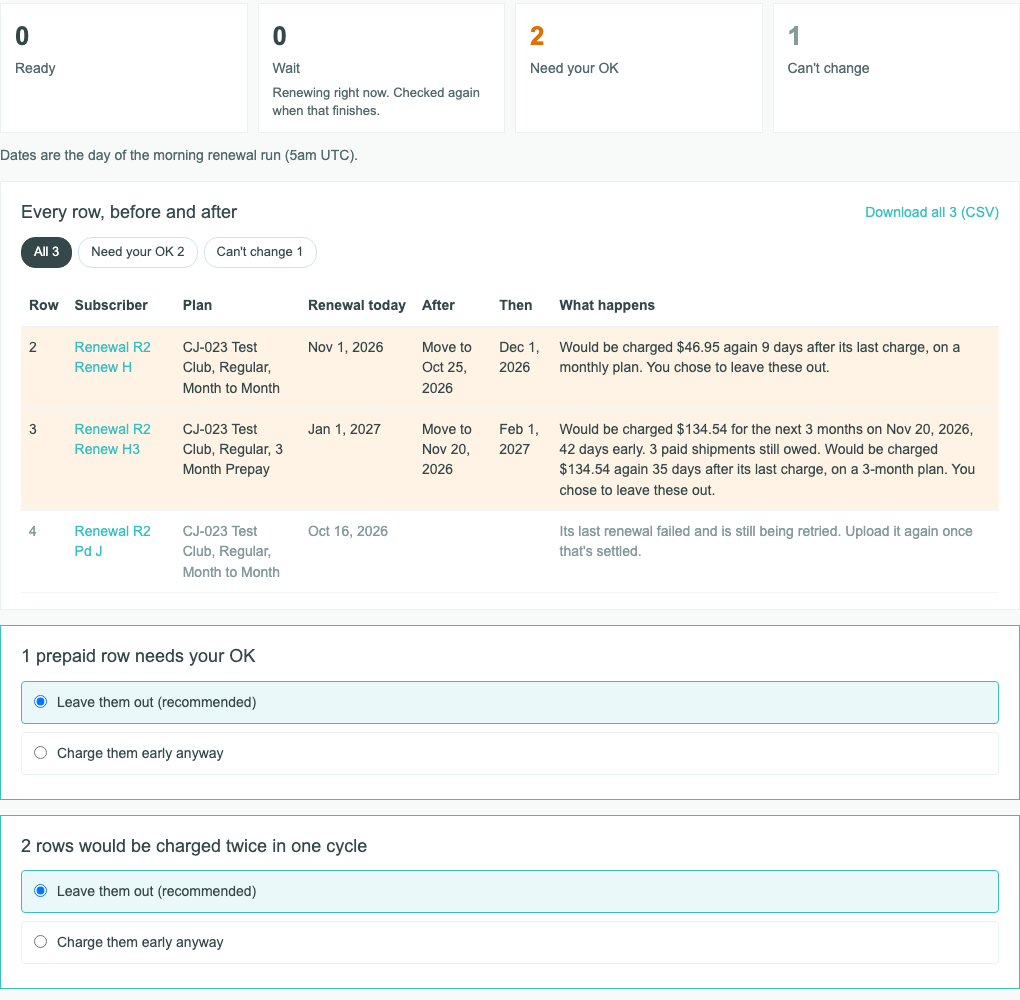
Under the list, each kind has its own choice, headed for example “1 prepaid row needs your OK” or “2 rows would be charged twice in one cycle”:
- Leave them out (recommended) is already chosen. The rows are left out, and their line ends “You chose to leave these out.”
- Charge them early anyway includes them. Nothing is charged when the rows apply. Each subscriber’s renewal then charges on the new date.
Your choice covers every row under that heading. A row with both kinds is included only when you choose Charge them early anyway for both.
Before an approved row applies, we work out its charge again. If it’s different, for example after a new address or a changed coupon, the row is left out: “Changed since you checked: its next charge is now”, with the new amount. If the amount can’t be worked out at all, the row can’t change: “The next renewal amount couldn’t be calculated. Upload the file again to recalculate it before you apply.”
Rows That Can’t Change
A row that can’t change shows the first reason that applies to it:
| Reason | What it means |
|---|---|
| “No action on this row.” | The row is blank, or has no subscription_id or no action. It changes nothing. |
| “Not a subscription ID. If Excel changed it (like 3.3E+09), format the column as text and export again.” | The subscription_id is a name, an email, or a number Excel rewrote. |
| “The action must be move, skip, or cancel.” | The action is something else. |
| “Not a subscription in your store.” | The ID isn’t one of your store’s subscriptions. |
| “Also on row 3. Only the first row for a subscription counts.” | The subscription is on an earlier row too. |
| “Its renewals aren’t billed by Cratejoy or cratejoy.com.” | Another system, such as your own Shopify store, bills it. |
| “Add its current_renewal_date from the template.” | current_renewal_date is blank or isn’t a date. |
| “It renews Dec 1, 2026 now, not Nov 1, 2026 as in your file. Download a fresh template.” | Its renewal date isn’t the one in your file: it changed since you made the file, or the date is wrong. This is also why a file uploaded twice changes nothing the second time. |
| “It renews Nov 1, 2026 now, not Oct 31, 2026 as in your file. Oct 31, 2026 is the same day in your time zone. Use the template’s dates.” | Your file has the day in your store’s time zone. Use the renewal run’s day, as the template has it. |
| “A move needs a new_renewal_date (YYYY-MM-DD).” | Add the date, as 2026-11-20 or 11/20/2026. |
| “Leave new_renewal_date blank for a skip or a cancel.” | Only a move takes a date. |
| “Cancelled on Oct 15, 2026.” or “Expired on Oct 15, 2026.” | It has already ended. Some say “Already cancelled.” or “Already expired.” To bring one back, reactivate it from its page. |
| “Its renewal retries have ended. Moving it would start charging it again.” | A Suspended subscription: a move or skip is left out. A cancel can apply. |
| “Its last renewal failed and is still being retried. Upload it again once that’s settled.” | A Past Due subscription: a move or skip is left out, because the retry decides its date. A cancel can apply. |
| “The new date must be tomorrow or later.” | Counted in UTC days. |
| “It already renews Nov 1, 2026.” | The new date is the date it renews on now. |
| “Already skipped. It renews Oct 15, 2028.” | Its next renewal is already skipped. |
| “It won’t renew, so there’s nothing to skip.” | A gift, or a subscription with auto-renew off. |
| “This subscription’s billing details can’t be read. Contact Cratejoy support to change it.” | We can’t tell when it renews, or how a new date would fall. |
| “We couldn’t tell what this subscription last paid for or when that paid term ends. Contact Cratejoy support to change it.” | We can’t tell whether the move would charge early, so we don’t guess. |
| “The next renewal amount couldn’t be calculated. Upload the file again to recalculate it before you apply.” | An early charge whose amount couldn’t be worked out can’t be approved. |
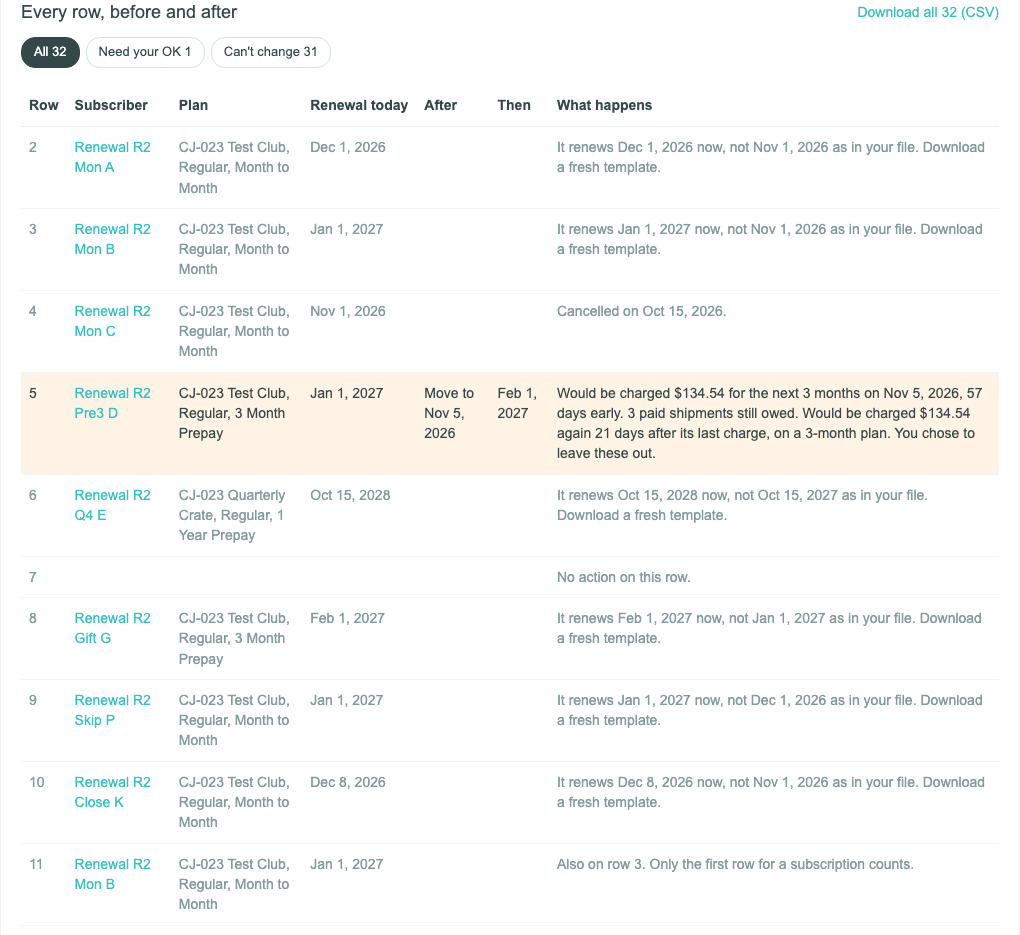
Past Due and Suspended Subscribers
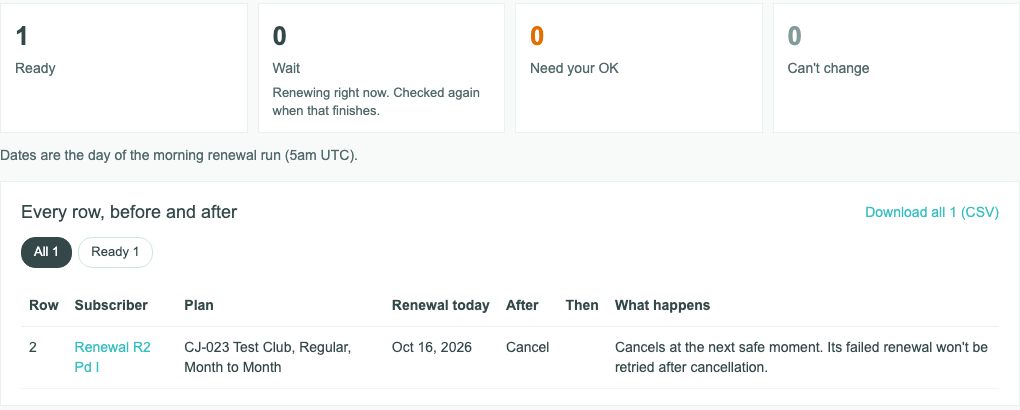
- A cancel applies. For a Past Due subscriber: “Cancels at the next safe moment. Its failed renewal won’t be retried after cancellation.” For a Suspended subscriber: “Cancels future renewals. It won’t be retried after cancellation.”
- A move or a skip is left out, with the reason in the table above.
- Undo doesn’t bring back a Past Due subscriber that an upload cancelled, because that would restart their renewal retries. See Tracking an Upload.
Dates and Time Zones
- Every date in an upload is the day of the morning renewal run, which starts at 5am UTC: “Dates are the day of the morning renewal run (5am UTC).”
- In US time zones that’s late the evening before, or shortly after midnight. Where your store’s time zone gives another day, the review shows both, for example “Nov 1, 2026 (Oct 31, 2026 in your time zone)”.
- A move’s new date must be tomorrow or later, in UTC days.
- Times on the upload’s page, such as when a row applied, are in your store’s time zone.
Common Questions
Why are rows I didn’t fill in listed?
Every row of your file is listed. A row with no action reads “No action on this row.” and changes nothing.
What happens to a row in Wait?
Its subscription was renewing when we checked. It’s included, and when the renewal finishes it’s checked again. If the renewal went through, it’s left out: “It renewed on Oct 16, 2026 before this row could apply. Upload it again if it still needs a change.”
Can I approve only some of the early charges?
No. Your choice covers every row under its heading. To charge only some, upload those rows in a file of their own.
Can I change my choices or my file?
Yes, until you apply. Click Back to return to a step. To use another file, go back to step 1 and click Choose another file, and every row of the new file is checked.
Related Articles
- Uploading Renewal Dates, Skips, and Cancellations
- Tracking an Upload: Results, Retry, Stop, and Undo
- How to Reactivate a Subscription
Questions? Contact support.